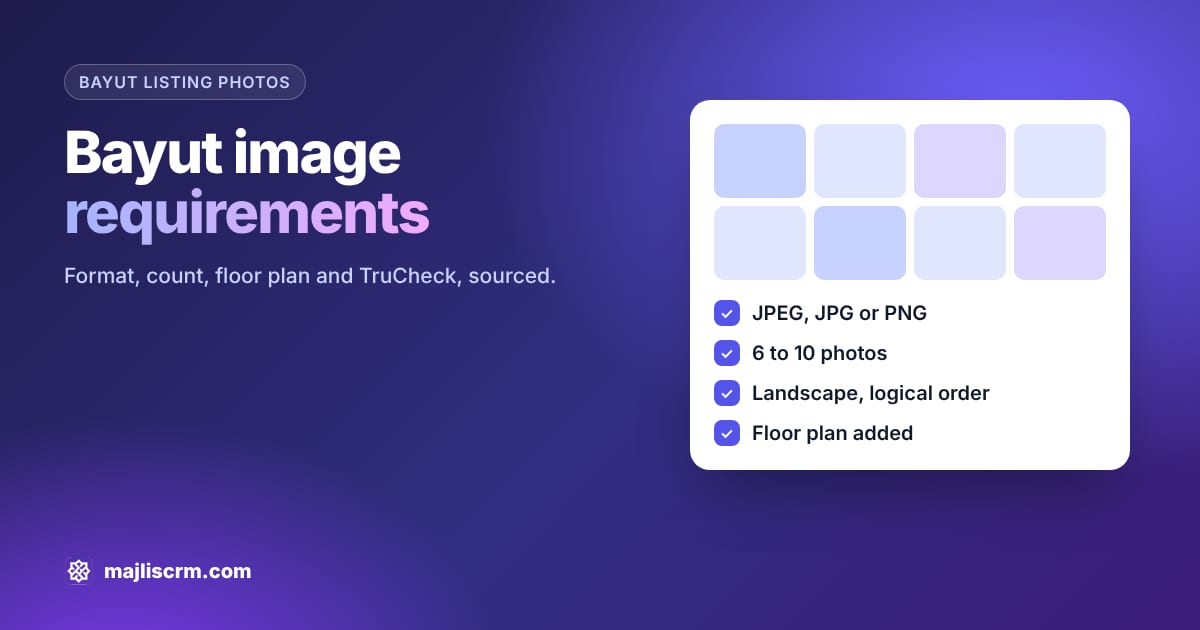
Quick answer: Bayut image requirements are short. Upload JPEG, JPG or PNG files only, aim for 6 to 10 photos (Bayut's own guides say 10), show each room in a logical order, add a floor plan, and keep every image relevant to the actual property. Bayut publishes no minimum pixel size or file size. Dubizzle rejects blurry, stock, collage and watermarked photos.
Key takeaways
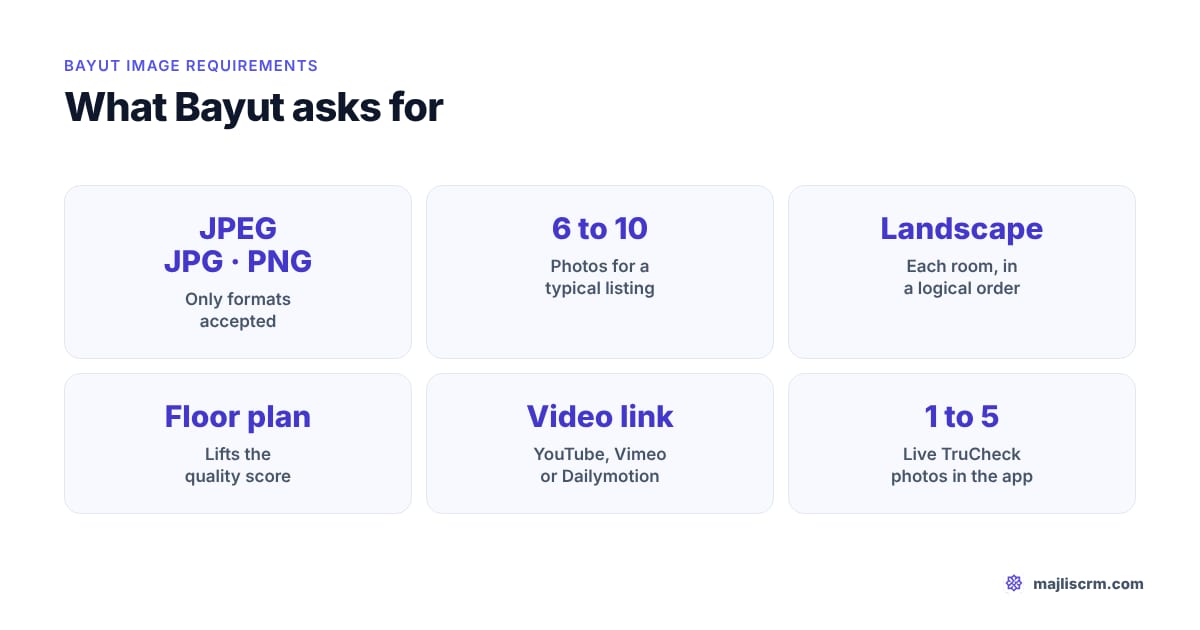
- Formats: Bayut accepts JPEG, JPG and PNG. Any other format is refused at upload.
- Count: Bayut says a typical listing needs 6 to 10 images depending on property type and bedrooms. Fewer keeps the listing's health score low.
- No published size: Bayut does not publish a minimum resolution, aspect ratio or maximum file size. Shoot landscape at your phone's full resolution and you will not hit a limit.
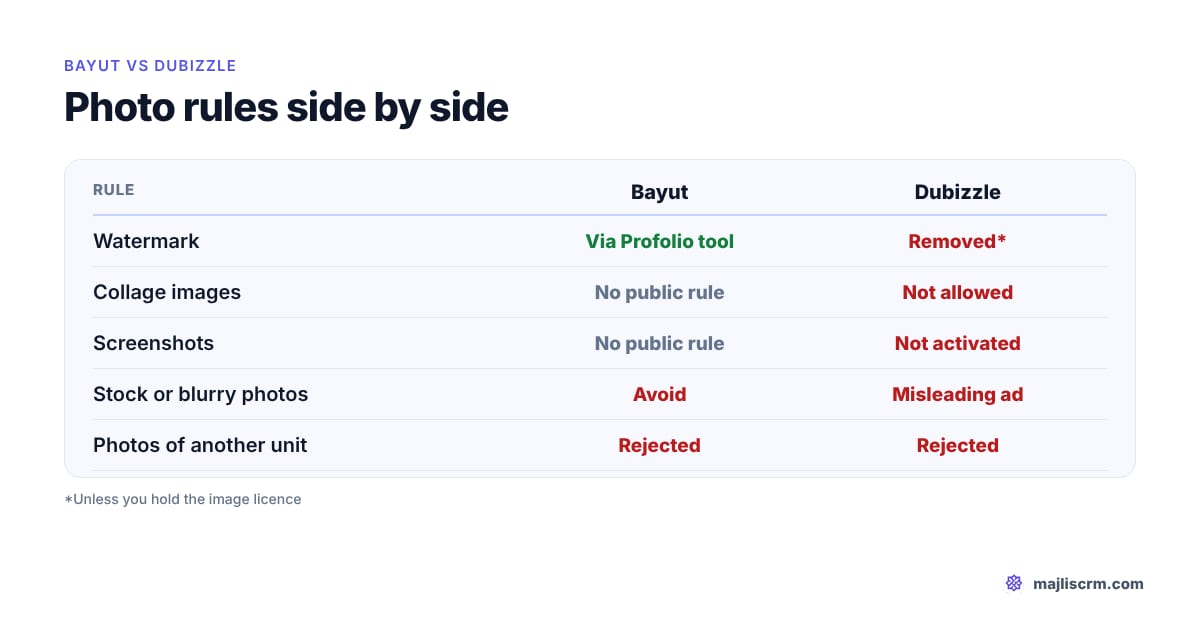
- Watermarks: Bayut offers its own watermark tool in Profolio and recommends a subtle one. Dubizzle removes ads with watermarked images unless you hold the licence to the image.
- Floor plans and video: floor plans lift the quality score; video tours go in as a YouTube, Dailymotion or Vimeo link.
- TruCheck: needs 1 to 5 live photos taken at the property in the Profolio app, matching the listing photos.
Last checked: 2 November 2026.
Photos are the first thing a buyer or tenant sees on Bayut, and they are also where most avoidable rejections and weak quality scores come from. This guide covers only the media side of a listing: the exact Bayut image requirements, what Dubizzle adds when the same listing goes there, and a shoot checklist an agent can follow on a phone in a JVC studio or a Dubai Hills villa. For the full listing (title, description, permit, pricing, Hot and Signature), read our guide to high quality listings on Bayut.
Where a figure comes only from an older Bayut agent portal post, or from Dubizzle rather than Bayut, we say so. Where Bayut publishes nothing, we say that too.
What are Bayut's image requirements?
Bayut's image requirements are the rules a listing's photos must meet to be accepted and to score well: file format, number of photos, relevance to the advertised property, and the extra photo rules for floor plans, watermarks and TruCheck verification. Bayut lists the reasons a listing is rejected, and one of the four is that "the uploaded images should be relevant to the advertised property and as per the image guidelines".
Here is everything Bayut and Dubizzle state, side by side, with where each rule comes from.
| Requirement | Bayut's rule | Source |
|---|---|---|
| File format | JPEG, JPG or PNG. Other formats are not accepted. | Bayut Help Centre, March 2024 |
| Number of photos | 6 to 10 for a typical listing, depending on property type and bedrooms | Bayut Help Centre, March 2024 |
| Recommended count | 10 high quality photos in a logical order | Bayut Agent Portal, 2021 (updated 2023) and 2022 (updated 2024) |
| Minimum resolution | Not published | No Bayut figure found |
| Aspect ratio | Not published as a rule; Bayut's photo guide says always shoot landscape | Bayut Agent Portal, December 2022 |
| Maximum file size | Not published | No Bayut figure found |
| Relevance | Images must be relevant to the advertised property, or the listing is rejected | Bayut Help Centre, June 2024 |
| Watermark | Allowed through Profolio's watermark tool; Bayut recommends a subtle one | Bayut Help Centre, March 2024; Agent Portal 2022 |
| Floor plan | Added from the floor plan icon in Manage Listings after posting; custom plans can be requested | Bayut Help Centre, 2024 and September 2026 |
| Video | A YouTube, Dailymotion or Vimeo link | Bayut Help Centre, September 2026 |
| TruCheck photos | 1 to 5 real-time photos taken at the property in the Profolio app | Bayut Help Centre, July 2026 |
| Dubizzle extras | No ads without images; no blurry images, screenshots, stock images, watermarks or collages | Dubizzle Help Centre, October to November 2026 |
Rule: if a rule is not in this table, Bayut has not published it. Treat "Bayut requires 1920 pixels" or "Bayut caps photos at 5 MB" style claims as unverified unless Bayut confirms them to you in writing.
How many photos does a Bayut listing need?
Bayut's help centre gives a range, not a single number: "the image requirements for a typical listing ranges between 6 to 10 depending on the property type and number of bedrooms." A studio in JLT needs fewer photos to show the whole home than a five-bedroom villa in Arabian Ranches, and the score reflects that.
Bayut's own agent guides go further and name 10. Its 2021 guide to quality listings (updated 2023) recommends "10 high-quality photos arranged in a logical order", and its 2024 "5 Secrets" post speaks of "a minimum of 10 great photos". Ten is the safe target for any home with a bedroom.
What happens if you have fewer? Bayut answers that directly for off-plan units where the developer supplied only five images: "your listing health will remain low in this case". There is no workaround published. More photos of the same thing will not help either; Bayut tells agents whose score does not improve to "check for duplicate uploads".
| Property (example) | Photos to plan for | Why |
|---|---|---|
| Studio, JVC | At least 6, ideally 10 | Living and sleeping area, kitchen, bathroom, balcony, building, view |
| 2 bedroom apartment, Dubai Marina | 10 | Each room once, plus view, building and amenities |
| 4 bedroom villa, Arabian Ranches | 10 or more | Every bedroom, garden, frontage, majlis, kitchen, community |
| Off-plan unit, Business Bay | As many real renders and plans as the developer supplies | Bayut says 5 developer images keep health low |
The middle column is our planning advice built on Bayut's 6 to 10 range, not a Bayut rule per property type.
What photo formats does Bayut accept?
Bayut accepts three formats for listing images: JPEG, JPG and PNG. Its help article on failed uploads says: "please ensure the format is either JPEG, JPG or PNG. Any other formats will not be accepted."
Two common traps follow from that:
- HEIC from iPhones. iPhones save photos as HEIC by default. If you upload straight from the phone to Profolio's web upload, convert first or set the camera to "Most Compatible" (Settings, Camera, Formats), which saves JPEG.
- Screenshots and PDFs. A floor plan saved as a PDF, or a screenshot of a developer brochure, is not a listing photo. Dubizzle explicitly refuses screenshots.
For Bayut's TruBroker Stories (a separate product from the listing gallery), Bayut accepts photos as JPEG or PNG and videos as MP4 or MOV.
What is the Bayut photo size and resolution?
Bayut does not publish a minimum pixel size, a required aspect ratio or a maximum file size for listing photos in its public help centre or agent portal, as of November 2026. We searched both. The only sizing guidance Bayut gives is qualitative: "upload high-quality images of your property" when posting, and for agent profile pictures, "high quality (HD) and not pixelated".
So what should you do? These are practical defaults, not Bayut rules:
- Shoot landscape. Bayut's smartphone photo guide says "always shoot in landscape rather than portrait". Search results and galleries on property portals are built for horizontal images, and a portrait photo wastes most of the frame.
- Use the phone's full resolution. A modern phone's standard camera gives you a sharp image well above anything a portal displays.
- Keep one aspect ratio across the set. The phone's default 4:3 is fine. Mixing square, 16:9 and 4:3 makes a gallery look careless.
- Do not upscale. Enlarging a small developer image does not add detail; it makes blur bigger.
If a Bayut upload fails and the format is right, ask Bayut support (support@bayut.com) for the limit that applies to your account and keep their answer. That is better than guessing.
Can you put a watermark or logo on Bayut photos?
Yes on Bayut, with Bayut's own tool. Profolio has a watermark setting under Agency Tools: choose Watermark, then Set Up Watermark, use your agency logo or upload a new one, and set "the position, size and visibility". A tick box applies it to older listings, and replacing the watermark updates it "on all the existing live listing images". Bayut's 2022 step-by-step lead guide recommends "a subtle watermark".
Using the tool rather than burning your logo into each file keeps your originals clean for brochures and other portals, and a rebrand changes every live image at once.
Dubizzle is stricter. Its ad posting rules say "No watermarks; This includes company names, mobile phone numbers, online media companies, etc. Unless you are the company with the license to use the image, ads with watermarked images will be removed. However, dubizzle watermarks are allowed." In practice: never upload a photo carrying another agency's or another portal's watermark, and never put a phone number on an image.
Agent profile photos are different again. Bayut's profile guidelines say "Do not include agency names or logos as watermarks on the picture" and the picture must not contain contact details.
Watch out: a photo with another brokerage's logo on it tells Bayut and Dubizzle moderators, and buyers, that you copied it. Shoot your own, or get the original file from the owner.
What gets Bayut listing photos rejected?
Bayut's public list is short: images that are not relevant to the advertised property, or that break its image guidelines, lead to rejection, and the exact reason is in the rejection email and under Rejected Properties in Profolio. Dubizzle publishes a more detailed list for every ad, property included. Because Bayut and Dubizzle are sister portals managed from the same Profolio account, it is sensible to meet both.
| Photo problem | Bayut | Dubizzle |
|---|---|---|
| Photos of a different property | Rejected (not relevant) | Rejected (misleading) |
| No images at all | Low quality score | Not activated |
| Blurry or unclear photos | No public rule for listings; refused in Stories | Not activated |
| Stock images | No public rule for listings; downloaded stock refused in Stories | Misleading ad |
| Screenshots | No public rule | Not activated |
| Collage (several photos in one image) | No public rule | Not allowed: upload one by one |
| Watermarks | Allowed through Profolio's tool | Removed, unless you hold the image licence |
| Phone numbers or contact details in images | Refused in Stories and profile photos | Not allowed (watermark rule) |
| "Sold" written on the image | No public rule | Not allowed: remove the ad instead |
| Duplicate uploads | Holds the quality score down | Repetitive ads rejected |
Bayut's TruBroker Stories rules are not listing rules, but they show what Bayut's moderators look for: blurry or dark images, "overuse of filters or obstructive graphics", phone numbers, email addresses, WhatsApp links and social handles, and stock images used without a licence are all reasons a story is rejected. If your listing photos would fail those tests, fix them anyway.
People in photos are not addressed by a published Bayut listing rule. Bayut's photo guide does tell agents to keep their own reflection out of mirrors, and a clean, empty room photographs better in any case.
Do floor plans count, and how do you add them?
Floor plans are part of Bayut's quality score. Bayut's 2021 quality listings guide (updated March 2023) says adding floor plans became mandatory for listing quality: "the listing quality is 'yellow' when floor plans are not updated. It turns green when floor plans are added." Bayut's 2024 Profolio guide describes the score as a three-colour scheme and lists "adding Floor Plans" among the ways to improve an orange listing.
How to add one, per Bayut's help centre:
- Post the listing first. Floor plans are added once the property is posted.
- In Profolio, open Manage Listings and click the floor plan icon on the listing.
- Pick the matching layout from Bayut's ready plans (Bayut offers 2D and 3D plans).
- If your layout is missing, use the link below the options to request a new plan. Bayut emails you when it is done, and it "would require some time".
Use Bayut's floor plan feature rather than uploading a plan as gallery photo number one. A floor plan as the cover image wastes the most valuable slot in search results, where buyers decide in a second whether to click.
Can you add video and 360 tours to a Bayut listing?
Video: yes, as a link. Bayut's posting steps say "If available add a video to your listing via a YouTube/Dailymotion/Vimeo link". You upload the tour to one of those three sites and paste the link in Profolio. Bayut says listings with video generate more leads, and buyers can filter search results for listings with video tours. Bayut publishes no length or resolution requirement for listing videos.
A good listing video for Bayut is a steady walkthrough in landscape, in the same order as the photos, with no phone numbers on screen. Keep it in landscape even if you also cut a vertical version for Instagram (see our guide to creating a real estate ad for that side).
360 tours: Bayut's quality listings guide names "360-degree photographs" as an extra that "often results in more qualified leads". Bayut does not publish how a 360 tour is attached or what format it needs in its current help centre, so check with your Bayut account manager before paying for a 360 shoot.
Which photo should be the cover, and in what order?
Bayut's guidance on order is consistent across its guides: photos in "a logical sequence that shows the full property", posted "in the same order that you would show the property", so the buyer feels they are touring it, starting from the entry. Its lead guide adds: "take a photograph of each room".
Bayut does not publish a rule for the cover photo. In practice the cover should be the photo that sells the click: the living room with the view in a Dubai Marina tower, the garden and pool for an Arabian Ranches villa, the bright main room for a JVC studio. Never a floor plan, a bathroom, a building lobby or a render of the community gate.
| Order | Apartment | Villa or townhouse |
|---|---|---|
| 1 (cover) | Living room with the view | Front elevation or garden with pool |
| 2 | View from balcony or window | Living room |
| 3 | Kitchen | Kitchen |
| 4 | Master bedroom | Master bedroom |
| 5 | Master bathroom | Master bathroom |
| 6 to 8 | Other bedrooms and bathrooms | Other bedrooms, majlis, maid's room |
| 9 | Balcony | Garden, terrace, roof |
| 10 | Building pool or gym | Community: park, pool, street |
This order is our suggestion that follows Bayut's "logical sequence" advice; Bayut does not prescribe a slot for each room.
How do photos affect the Bayut quality score and TruCheck?
The quality score is Bayut's three-colour rating of each listing in Profolio. Bayut says the higher the score, "the higher it ranks on Bayut's search results", and that agents can lift a weak listing "by adding more images, adding Floor Plans or getting the Checked and TruCheck badge". Bayut does not publish the weight of each factor. Hover over the score in Manage Listings to see what Bayut thinks is missing, and allow some time after editing, since Bayut says the score can take a while to update.
TruCheck is Bayut's badge for listings verified as authentic and available. It is where photo rules are strictest, because the photos prove you were at the property:
- The listing must already be Checked (a valid permit that matches the listing details). Our Trakheesi permit guide covers that step.
- In the Profolio app, open the listing, tap Apply TruCheck and take 1 to 5 real-time photos at the property. Gallery uploads do not count; Bayut says images "are to be taken and uploaded at the property itself via the Profolio app" so the location is authentic.
- Apartments: at least one clear photo from outside with the main door open, showing the unit number and part of the interior. Supporting photos from inside should match the listing photos.
- Villas and townhouses: at least one clear photo from inside, with supporting exterior and interior photos matching the listing.
- Offices in business centres: the office number with the door open, showing the inside.
- You cannot reuse one photo to TruCheck several apartments in the same building.
Bayut says TruCheck listings received five times more leads and 20 times more impressions, and are boosted to the top of each listing category (Signature, Hot and Standard). Those are Bayut's own figures (agent portal post updated June 2026). TruCheck validity depends on whether the listing is for rent or sale, and must be reapplied after it expires.
Tip: the TruCheck photos must match your gallery. If you used a photographer's edited set, take the TruCheck photos from the same angles so the moderators can match them.
How should agents shoot photos for Bayut? A checklist
Bayut's two smartphone photography guides (2021 and 2022) give the core advice. Here it is as a checklist you can run on any viewing, with our additions marked.
Before the shoot
- Clean and declutter: made beds, clear counters, toilet seats down, no personal photos or laundry. Bayut's own photography team cancels shoots when a property is untidy.
- Book the right time. Bayut suggests 7:30 am to 11:00 am or 4:30 pm to 6:00 pm, or just after sunrise and before sunset. Avoid night shots unless the view is the point.
- Open every curtain and blind, switch on every light, and turn off TVs and screens (our addition).
- Wipe the phone lens. Fingerprints are the most common cause of hazy photos (our addition).
Phone settings
- Switch to the wide-angle (0.5x) lens at the start, as Bayut advises, and shoot small rooms from a corner.
- Turn on gridlines (iPhone: Settings, Camera, Grid; Android: camera settings) and keep vertical lines straight.
- Hold the phone horizontally: landscape only.
- Tap to focus on the feature you want sharp, such as the view or the kitchen.
- On iPhone, set Formats to Most Compatible so files save as JPEG (our addition, because Bayut accepts only JPEG, JPG and PNG).
- Keep HDR on for rooms with bright windows, and flash off (our addition).
During the shoot
- Shoot at chest height, phone level, elbows tucked in or on your knees, and use the volume button as the shutter.
- Follow the room order in the table above, entry first, so editing is quick.
- Keep yourself out of mirrors and glass.
- Take two or three frames per room and pick the sharpest.
- Record a short landscape walkthrough for the video link while you are there.
- For TruCheck, take the door-open unit number photo in the Profolio app before you leave.
After the shoot
- Adjust brightness, contrast and temperature only. Bayut mentions Snapseed, VSCO, PicsArt or the phone's own editor. No heavy filters, no text, no collages.
- Choose the cover, then 9 or more photos in order, with no near-duplicates.
- Add the floor plan from Profolio after posting, and paste the video link.
If you also list on Property Finder, its rules differ in places; see our sibling guide to Property Finder image requirements before you reuse a Bayut set there.
How can a brokerage keep every listing's photos at this standard?
The hard part is fifty agents applying these rules every week. Use one shared shoot checklist, have a manager check the cover and the count before anything goes live, and keep master photos in one place so nobody pulls images from WhatsApp groups or another agency's ad.
In Majlis CRM, listings are written once and published to Bayut and Dubizzle from the CRM, with the DLD permit number as part of the listing, so a listing cannot go to the portals without one. Photos uploaded to a listing are rotated upright, have their location (EXIF and GPS) data stripped, and are resized automatically, so a phone photo taken sideways or carrying the property's coordinates does not go out as it is. The same photos build a branded PDF brochure for the buyer. More on that in listing management, or book a demo to see it with your own listings.
Frequently asked questions
What is the minimum number of photos for a Bayut listing?
Bayut does not set a hard minimum that blocks posting, but its help centre says a typical listing needs 6 to 10 images depending on property type and bedrooms, and a listing below that keeps a low health score. Bayut's agent guides recommend 10 photos in a logical order.
What is the Bayut photo size?
Bayut does not publish a minimum resolution, aspect ratio or maximum file size for listing photos as of November 2026. Shoot in landscape at your phone's full resolution, keep one aspect ratio across the set, and upload JPEG, JPG or PNG files.
Does Bayut accept HEIC or WebP photos?
Bayut's help centre says only JPEG, JPG and PNG are accepted for listing images, and other formats will not be accepted. Convert iPhone HEIC files to JPEG before uploading, or set the camera to Most Compatible.
Can I add my agency logo to Bayut listing photos?
Yes. Profolio's Agency Tools include a watermark setting where you choose the logo, position, size and visibility, and Bayut recommends a subtle watermark. Dubizzle removes ads with watermarked images unless you hold the licence to the image, and agent profile photos must carry no logo.
Can I use developer renders for an off-plan listing on Bayut?
Yes, off-plan listings normally use developer material, but Bayut says a listing with only five developer images will keep a low health score because typical listings need 6 to 10. Ask the developer for more images and floor plans, and never use stock photos of other projects.
How many photos do I need for TruCheck?
Between 1 and 5 real-time photos, taken at the property in the Profolio app. For an apartment, one must show the open main door with the unit number and part of the interior, and the rest should match your listing photos.
Do Bayut and Dubizzle use the same photos?
Bayut and Dubizzle listings are managed from the same Profolio account, so the same gallery usually serves both. Dubizzle's ad rules add explicit bans on screenshots, stock images, collages and watermarks, so a set that meets Dubizzle's rules is safe on Bayut too.
Portal rules change without notice. This guide reflects Bayut's and Dubizzle's published help pages as of November 2026; check Profolio and your rejection emails for the rule that applies to a specific listing.
Sources
- Why can't I upload images to my listing?, Bayut Help Centre, updated 18 March 2024
- How can I improve the health of my off-plan listing if I've received only 5 images from the developer?, Bayut Help Centre, updated 18 March 2024
- Why is my listing rejected?, Bayut Help Centre, updated 5 June 2024
- How can I post my listing on Bayut using Profolio?, Bayut Help Centre, updated 30 September 2026
- Where can I find the option to submit floor plans for my listings in Profolio?, Bayut Help Centre, updated 2 April 2024
- How can I add a watermark to my listing images?, Bayut Help Centre, updated 22 March 2024
- How can I update/amend my watermark?, Bayut Help Centre, updated 22 March 2024
- Why is my Listing Quality Score not improving after editing the listing?, Bayut Help Centre, updated 18 March 2024
- Why can't I view my Listing Quality Score?, Bayut Help Centre, updated 18 March 2024
- How can I apply for a TruCheck badge?, Bayut Help Centre, updated 16 July 2026
- What are the guidelines to be followed when uploading pictures for TruCheck?, Bayut Help Centre, updated 18 December 2024
- Why has my TruCheck verification failed for a completed project?, Bayut Help Centre, updated 26 March 2024
- Can I upload the same image to TruCheck multiple apartments within the same building?, Bayut Help Centre, updated 28 August 2024
- Why do my approved TruChecked properties only show a Checked badge?, Bayut Help Centre, updated 26 March 2024
- How can I ensure my agent profile details are complete?, Bayut Help Centre, updated 23 June 2026
- What type of media can I use for stories?, Bayut Help Centre, updated 12 May 2026
- What are some of the situations that will lead to rejection? (TruBroker Stories), Bayut Help Centre, updated 12 May 2026
- What steps can I take to guarantee the successful completion of my photography request?, Bayut Help Centre, updated 22 March 2024
- 3 Steps To Creating Quality Listings On Bayut, Bayut Agent Portal, 1 August 2021 (updated 15 March 2023)
- Your Step-By-Step Guide To Maximising Leads on Bayut, Bayut Agent Portal, 10 March 2022 (updated 24 October 2024)
- 5 Secrets To Boost Your Property Listings On Bayut, Bayut Agent Portal, 30 October 2024
- How To Shoot Stunning Real Estate Photos With Your Smartphone, Bayut Agent Portal, 22 December 2022 (updated 13 February 2023)
- Using Your Smartphone To Take Professional Real Estate Photos, Bayut Agent Portal, 18 October 2021
- Getting Real With Real Estate Video: The Agent's Quick Guide To Videos, Bayut Agent Portal, 23 August 2023
- Here's Your Guide To The TruCheck Badge, Bayut Agent Portal, 28 October 2024 (updated 8 June 2026)
- The Best Of Profolio: Top Features For UAE Real Estate Agents, Bayut Agent Portal, 5 November 2024
- dubizzle Ad Posting Rules, Dubizzle Help Centre, updated 31 October 2026
- Why was my Ad rejected?, Dubizzle Help Centre, updated 2 November 2026
- How do I post an ad on dubizzle?, Dubizzle Help Centre, updated 16 October 2026