Quick answer: Property Finder image requirements in the UAE: landscape photos with a width to height ratio between 1.3 and 1.8, at least 800 x 600 pixels, unique, bright and real. Upload 4 to 10 photos minimum depending on size, 30 at most. A subtle company logo watermark is fine; contact details, collages and duplicates are not.
Key takeaways
- Property Finder's UAE checklist sets a minimum of 4 photos for a studio, rising to 10 for four bedrooms and up, and a maximum of 30 for every property type.
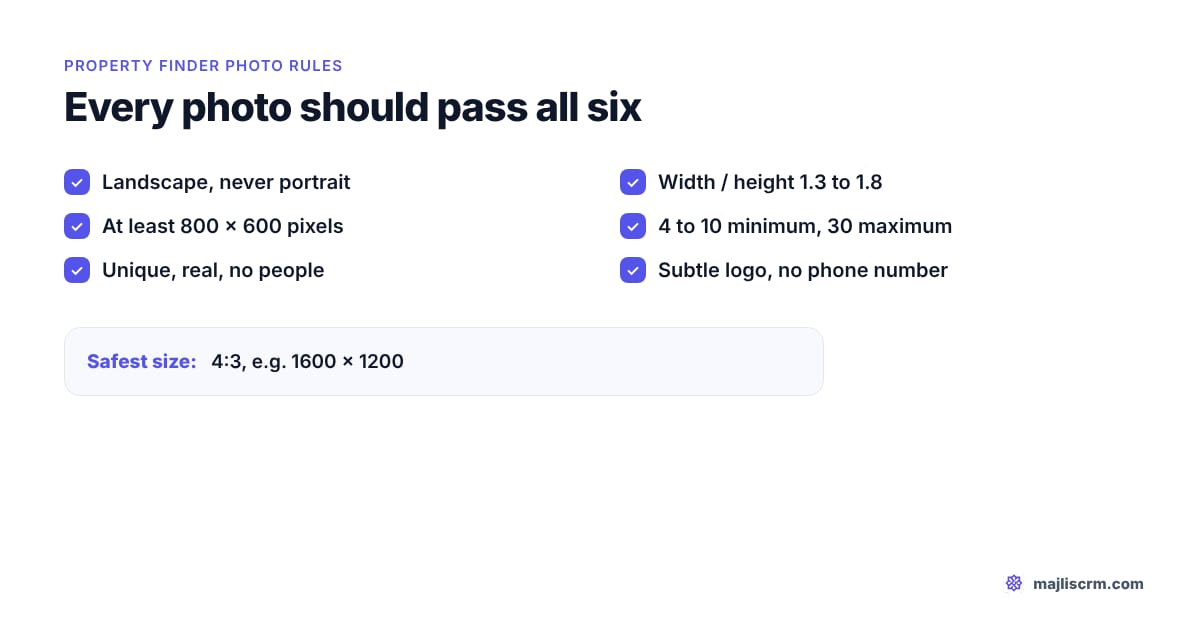
- Photos must be landscape, with a width divided by height between 1.3 and 1.8, and at least 800 x 600 pixels. A 4:3 photo such as 1600 x 1200 sits safely inside both.
- Property Finder publishes no file size limit or file format list on its public pages. Its Enterprise API documentation is password protected.
- A subtle watermark of your company logo is accepted. Large or double watermarks, footers with your name or mobile, collages, people and duplicates are not.
- Breaking the image rules can lower the listing's quality score or get the listing removed, and poor images stop a listing being verified.
- Video tours go in as a YouTube link and 360 tours as a link from an approved provider; neither is an uploaded file.
Last checked: 2 November 2026.
Property Finder image requirements decide two things before a buyer ever reads your description: whether the listing ranks well in search, and whether it can be verified at all. Most agents learn the rules by getting a listing bounced. This guide collects every rule Property Finder has published about listing photos, video and 360 tours, says where each one comes from, and flags the figures Property Finder simply does not publish. For the rest of the listing (title, description, location, permits and upgrades), see our guide to high quality listings on Property Finder.
What are Property Finder's image requirements in 2026?
Property Finder's image requirements are the rules on photo count, shape, resolution and content that a listing must meet to score fully and to be verified. They are spread across a UAE quality score checklist, a verified listing fact sheet, the UAE help centre's "AAA Stock Quality Rules" and help articles on Property Finder's other market sites. Here they are in one place.
| Requirement | Property Finder's rule | Source |
|---|---|---|
| Minimum photos | 4 (studio) to 10 (4+ bedrooms); 5 or 10 for commercial types | PF UAE quality score checklist |
| Maximum photos | 30 for every property type | PF UAE quality score checklist |
| Orientation | Landscape only, no portrait photos | PF UAE quality score checklist |
| Aspect ratio | Width divided by height between 1.3 and 1.8 | PF UAE help centre, AAA Stock Quality Rules (secondhand) |
| Minimum resolution | 800 x 600 pixels | PF verified listing checklist; PF Egypt help centre |
| Recommended size | 4:3, for example 1600 x 1200 | PF Bahrain help centre (secondhand) |
| File format | Not published | None found |
| File size limit | Not published | None found |
| Watermark | Subtle, showing your company logo; no large or double watermarks | PF verified listing checklist |
| Text on images | No footers such as your name or mobile number | PF verified listing checklist |
| Duplicates | Every image unique, and you hold the rights to it | PF UAE quality score checklist |
| People | Exclude people from shots | PF verified listing checklist |
| Renders | CGIs and developer images not approved for verification | PF verified listing checklist |
| Collages | Not allowed; one element of the property per image | PF verified listing checklist; PF Egypt help centre |
| Main image | Superb quality; a bathroom as the main image will not be approved | PF verified listing checklist |
| Video tour | YouTube link in the Video Tour URL field, one property per video | PF Bahrain blog and help centre |
| 360 tour | Link in the 360 URL field, from an approved provider | PF Bahrain help centre (secondhand) |
| Floor plans | No public specification found | None found |
| Penalty | Lower quality score or listing removed, depending on severity | PF UAE help centre, AAA Stock Quality Rules (secondhand) |
"Secondhand" means the page blocked direct access and the wording comes from search summaries of it. The UAE checklist and verified listing fact sheet are Property Finder PDFs dated 2020 and 2021: the rules it has published, not a promise nothing has moved. The live quality score in PF Expert is the final word.
How many photos does a Property Finder listing need?
It depends on the property. Property Finder's UAE checklist sets a minimum by bedroom count for residential listings and by type for commercial ones, with a ceiling of 30 photos for all of them.
| Residential listing | Minimum photos | Maximum photos |
|---|---|---|
| Studio | 4 | 30 |
| 1 bedroom | 5 | 30 |
| 2 bedrooms | 6 | 30 |
| 3 bedrooms | 8 | 30 |
| 4 bedrooms | 10 | 30 |
| 5+ bedrooms | 10 | 30 |
For commercial listings the same checklist asks for 10 photos for bulk rent units, business centres, compounds, full floors, half floors and villas, and 5 for co-working space, factories, farms, labour camps, land, office space, retail, shops, showrooms, staff accommodation, warehouses, whole buildings and hotel apartments.
The important line is this one, from the checklist itself: there is no impact on the quality score once the minimum is uploaded, and "more images won't mean better Quality Score". In other words, the minimum earns the full photo credit; extra photos help buyers, not the score.
Watch out: Property Finder's Bahrain blog gives a simpler rule for a 100% score: "You have uploaded 10 photos." That is a different market's checklist. In the UAE, a 2-bedroom in JVC needs 6 by the published table, but uploading 10 good ones costs you nothing and covers you if the UAE scoring has moved to a flat 10.
So how many should you actually upload?
Upload enough to answer every question a buyer would ask on a viewing, and stop before you repeat yourself. A sensible target: 10 to 15 for an apartment in Dubai Marina or Business Bay, 15 to 25 for a villa in Arabian Ranches or Dubai Hills, always under the 30 limit. Every photo should show something the previous one did not.
What is the Property Finder photo size, resolution and aspect ratio?
Property Finder's photo size rule has three parts, and a photo should pass all three:
- Landscape. The UAE checklist says all images must be landscape, "no portrait photos".
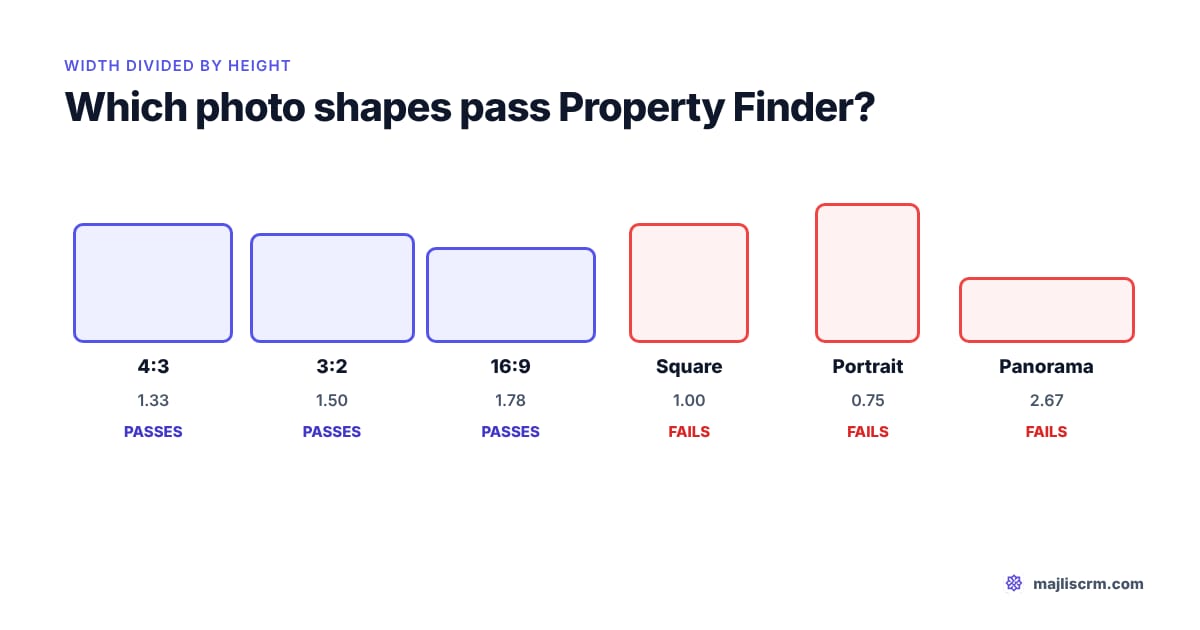
- Aspect ratio between 1.3 and 1.8. Aspect ratio is the width divided by the height. Property Finder's AAA Stock Quality Rules set this range.
- At least 800 x 600 pixels. The verified listing checklist calls 800 x 600 the suggested dimensions, and the Egypt help centre calls it the minimum resolution.
The Egypt help centre words the last rule as "800 x 600 pixels (or a ratio between 1.3 and 1.8)", which reads as if either would do. Do not rely on that "or". A photo that meets both is safe everywhere; one that meets only one of them is a gamble.
Property Finder's Bahrain help centre recommends 4:3, giving 1600 x 1200 pixels as the example "to maximize the Listing's Quality Score". That is the safest single target, and it is the native shape of most phone cameras.
Will my photo pass? Common sizes worked out
| Photo | Pixels | Width / height | Passes? |
|---|---|---|---|
| Phone camera, default 4:3 | 4000 x 3000 | 1.33 | Yes |
| Recommended upload size | 1600 x 1200 | 1.33 | Yes |
| DSLR or mirrorless, 3:2 | 6000 x 4000 | 1.50 | Yes |
| Widescreen 16:9 | 1920 x 1080 | 1.78 | Yes, just inside the limit |
| Square crop | 3000 x 3000 | 1.00 | No, below 1.3 |
| Portrait phone photo | 3000 x 4000 | 0.75 | No, portrait |
| Phone panorama of the view | 8000 x 3000 | 2.67 | No, above 1.8 |
| Old or heavily compressed image | 640 x 480 | 1.33 | No, under 800 x 600 |
The panorama catches agents out. That sweeping Burj Khalifa shot from a Downtown balcony is at 2.67, outside the range. Crop it to 4:3 or 3:2 around the best part of the view and it passes.
What file format and file size does Property Finder accept?
Property Finder does not publish a file format list or a maximum file size on any public page we could find, in the UAE or its other markets. Its Enterprise API documentation, where a developer would expect such limits, is password protected. Anyone quoting you an exact megabyte limit for Property Finder should be able to show you where it comes from.
What is safe in practice (our advice, not a Property Finder rule): export JPEG photos in the sRGB colour space, at around 1600 to 2500 pixels on the long side in a 4:3 or 3:2 shape. That is comfortably above 800 x 600, sharp on a large screen, and small enough to upload quickly from PF Expert. If an upload fails, the error message in PF Expert, or your Property Finder account manager, is the authority.
Can you watermark Property Finder photos?
Yes, within limits. Property Finder's UAE quality score checklist lists "all images are subtly watermarked" as a good practice, and its verified listing checklist sets the limits:
- The watermark represents your company logo.
- The watermark is subtle.
- Excessively large watermarks or double watermarks will not be approved.
- Images have no footers, for example your name or mobile number.
A small, semi-transparent logo in one corner meets all four. A logo across the middle of the living room, a second logo from the photographer, or a strip along the bottom with your WhatsApp number does not.
Property Finder now checks this by machine. An Amazon Web Services article written with Property Finder's team (27 October 2026) says Property Finder processes tens of thousands of property images a day, and its system checks 11 attributes per image, including watermark detection, room classification, furnishing status, photo quality and construction indicators, before images go live. It notes that decorative Arabic text on some images is not treated as a watermark. A heavy watermark is no longer something a busy reviewer might miss.
What gets Property Finder photos rejected or lowers the quality score?
Property Finder's AAA Stock Quality Rules say that when the image rules are not met, it may reduce the listing's quality score or remove the listing, depending on how serious the problem is. The verified listing checklist lists "poor quality/non-compliant images" among the reasons verification is refused. Pulling the published rules together, these are the things to avoid:
| Problem | What Property Finder says |
|---|---|
| Portrait photos | All images must be landscape |
| Wrong shape | Width / height outside 1.3 to 1.8 |
| Pixelated or dark photos | "Pixelated, dark, images won't be approved" |
| Duplicates | All images unique, no duplications |
| Large, double or contact watermarks | Not approved; logo only and subtle |
| People in shot | All images exclude people |
| Renders and developer images | Computer generated or developer images not approved for verification |
| Exterior only | Include interior shots, not just the outside |
| Collages | Images are not a collage |
| A weak main image | A bathroom as the main image will not be approved |
| Screenshots | Property Finder's Qatar and Bahrain blogs say never to use them |
| Photos you do not own | You must have all the rights to use every image |
On renders: the verified listing fact sheet also says off-plan properties are not verified (agents can add the off-plan tag instead). The "no CGIs" rule is stated as a verification requirement. If you list an off-plan unit in Dubai Creek Harbour with developer renders, it will not be a verified listing anyway; for a ready unit, renders cost you verification.
Tip: Property Finder's Bahrain photography tips warn against over editing: light polishing is fine, changing colours, shades or details is not. A sky replacement on a grey day is borderline; removing a crack in the wall is misleading.
How do photos feed the Property Finder quality score?
The Property Finder quality score is a rating Property Finder gives each listing based on the completeness and quality of its content; higher scoring listings rank higher in search results, according to its UAE checklist. Photos feed it in three ways.
- Count. Meeting the minimum for the property type earns the photo credit. Going above it adds nothing to the score.
- Compliance. Breaking the image rules can reduce the score or remove the listing.
- Verification. Poor or non-compliant images stop a listing being verified, and Property Finder's partner hub says verified listings generate four to six times more leads than non-verified ones. It does not say how that figure was measured.
Property Finder does not publish the weight photos carry in the score. With the automated checks described in the October 2026 AWS article, assume that every image is looked at, not just counted: ten photos of the same corner will not do the job of ten different rooms.
Which photo should be the cover, and in what order?
The cover (main) photo is the one shown in search results, so it decides whether a buyer clicks. Property Finder's advice is to use your best picture as the main photo, and to look for "the picture with the widest angle and best lighting". Its verified checklist adds that the main image must be of superb quality, and a bathroom will not be approved as the main image.
Good cover choices by property type:
- Apartment with a view (Dubai Marina, Downtown, Palm Jumeirah): the living room shot that includes the window and the view, not the view alone.
- Apartment without a view (JVC, Al Furjan): the brightest wide shot of the living and dining area.
- Villa or townhouse (Arabian Ranches, Dubai Hills, Damac Hills): the front elevation in daylight, or the garden and pool if that is the selling point.
- Office (Business Bay, JLT): the widest shot of the open floor with natural light.
Order the rest the way a viewing walks: cover, living area, kitchen, master bedroom, master bathroom, other bedrooms, other bathrooms, balcony or garden, then building amenities (pool, gym, lobby) and the community. You set the order by dragging photos in the Media section when creating or editing the listing, according to Property Finder's help centre. A worked example for a 2-bedroom in JVC with 10 photos: living room, dining area, kitchen, master bedroom, master bathroom, second bedroom, second bathroom, balcony, pool, building entrance.
How do floor plans, video tours and 360 tours work on Property Finder?
Video tours
A Property Finder video tour is a YouTube link, not an uploaded file. Property Finder's Bahrain and Qatar blogs list the requirements: upload the video to YouTube, use a link in YouTube format, keep the content within Property Finder's terms, and make sure the video is about one individual property. The help centre article on adding media says to paste the link into the Video Tour URL field in the Media section. Search summaries of that article also say YouTube Shorts are not supported and suggest videos of at least one minute in landscape; we could not open the page to confirm those details.
Property Finder's partner hub separately recommends vertical 1080 x 1920 clips of about 60 seconds for Instagram Reels, TikTok and WhatsApp. That is social media advice. For the portal, shoot a landscape walkthrough for YouTube, ideally on the same visit.
360 tours
A 360 tour (virtual or 3D tour) goes in the 360 URL Link field at the bottom of the Media section, according to Property Finder's help centre, which keeps a list of approved 3D tour providers. We could not open that list, so check it in your help centre before paying for a tour from a provider Property Finder may not display.
Floor plans
We found no public Property Finder specification for floor plans: no size, format or count rule on the help centre pages or partner hub material we could reach. If you upload one, the same sense applies: a clean, legible plan, landscape where possible, with no agent contact details on it. Ask your account manager whether floor plans count toward the quality score in your account.
What should agents check before, during and after the shoot?
Use this as a shoot checklist for every Property Finder listing. Each line maps to a published rule or to Property Finder's own photography advice.
Before the shoot
- Work out the minimum for the unit (6 for a 2-bedroom, 10 for a 4-bedroom or villa) and plan a few more.
- Declutter and stage every room you will show; clean the lens.
- Book daylight hours; Property Finder's Bahrain blog says dark photos are likely to be overlooked.
- Ask the tenant or owner to move personal photos and to stay out of shot.
During the shoot
- Shoot landscape only, in 4:3 or 3:2. Turn panorama mode off.
- Use a tripod and keep vertical lines straight; no crooked shots.
- Shoot from a corner to include two walls for a wider room.
- Cover every room, the view, the balcony or garden, and building amenities. Include interiors, not just the outside.
- Take one clear photo of each element; no collages later.
- Record a landscape walkthrough of at least a minute for YouTube.
After the shoot
- Drop duplicates and near duplicates.
- Edit lightly: straighten, brighten, no colour or detail changes.
- Export JPEG at about 1600 to 2500 pixels on the long side; check nothing is under 800 x 600.
- Add only a small, subtle company logo; no names, numbers or second logos.
- Pick the cover: widest angle, best light, never a bathroom.
- Order photos in viewing order, then check the listing's quality score in PF Expert.
Rule: A photo must be landscape, between 1.3 and 1.8 wide for every 1 high, at least 800 x 600, real, unique and free of contact details. Anything else risks the score, the verification or the listing.
Do the same photos work on Bayut and Dubizzle?
Mostly, because a landscape, well lit, honest photo is what every portal wants. The exact limits differ, so check each portal's own rules rather than assuming one portal's numbers apply to another. Our guide to Bayut image requirements covers Bayut and Dubizzle, and how to create a real estate ad covers the wider job of turning a listing into an ad that gets enquiries.
Where does a CRM fit into listing photos?
Property Finder listings themselves are still created and published in PF Expert. What a CRM changes is what happens around them. In Majlis CRM, every Property Finder enquiry arrives in the same pipeline as your Bayut, Dubizzle, WhatsApp and website leads, so a well photographed listing that starts pulling enquiries is answered quickly rather than lost in an inbox. See how Property Finder leads reach Majlis.
Photos you upload to a listing in Majlis are rotated upright, have their location data (EXIF and GPS) stripped and are resized automatically. That last point matters more than it sounds: a photo taken on a phone inside an owner's villa carries the exact coordinates of the house, and stripping it protects the owner before the image goes anywhere. More on how Majlis handles listings is on the listing management page.
Frequently asked questions
What is the Property Finder photo size?
Property Finder asks for landscape photos at least 800 x 600 pixels with a width to height ratio between 1.3 and 1.8. Its Bahrain help centre recommends 4:3, for example 1600 x 1200 pixels. It publishes no maximum file size.
How many photos can I upload to a Property Finder listing?
Up to 30 photos for any property type, according to Property Finder's UAE quality score checklist. The minimum ranges from 4 for a studio to 10 for four bedrooms and above, and 5 or 10 for commercial types. Uploading more than the minimum does not raise the quality score.
Are watermarks allowed on Property Finder?
Yes, a subtle watermark of your company logo is allowed. Property Finder will not approve excessively large or double watermarks, or footers with your name or mobile number. It now detects watermarks automatically.
Can I use portrait or square photos on Property Finder?
No. Property Finder requires landscape photos, and a square (ratio 1.0) or portrait photo falls outside the 1.3 to 1.8 range. Crop or reshoot them in 4:3 or 3:2.
Can I use developer renders on Property Finder?
Property Finder's verified listing checklist says computer generated and developer images will not be approved for verification, and asks for genuine images of the property. Off-plan properties are not verified anyway; they can carry the off-plan tag instead. For a ready unit, use real photos.
How do I add a video tour to Property Finder?
Upload the video to YouTube, then paste the YouTube link into the Video Tour URL field in the listing's Media section. The video must be about one individual property. 360 tours go in the separate 360 URL Link field.
Do more photos improve the Property Finder quality score?
No. Property Finder's checklist says there is no impact on the score once the minimum is uploaded, and more images will not mean a better score. Extra photos still help buyers decide, so upload as many useful, unique photos as the property deserves, up to 30.
Sources
- How to get top quality score checklist, Property Finder Hub (UAE), PDF dated January 2021.
- Verified listing fact sheet and checklist, Property Finder (UAE), PDF dated December 2020.
- AAA Stock Quality Rules, Property Finder Help Centre UAE, undated (read via search summaries; the page blocked direct access).
- What is the Listing Quality Score?, Property Finder Help Centre Egypt, undated (read via search summaries).
- Adding Media (Images, Video Tours, 3D Tours) to your listings, Property Finder Help Centre Bahrain, undated (read via search summaries).
- 4 easy steps to create better property listings, Property Finder Bahrain blog, undated.
- Update to video tour upload process, Property Finder Bahrain blog, 2020.
- Listing Photos Do's and Don'ts, Property Finder Bahrain blog, undated.
- Property Photography Do's and Don'ts, Property Finder Qatar blog, undated.
- Tips for Photographing Your Properties, Property Finder Bahrain blog, undated.
- Get more leads by verifying your listing, Property Finder Partner Hub (UAE), undated.
- From Listing to Lifestyle: Crafting Video Tours that Sell in 60 Seconds, Property Finder Partner Hub (UAE), undated.
- Fix evaluation bias to unlock better models on Amazon Bedrock, AWS Machine Learning Blog, 27 October 2026.
- Property Finder Enterprise API documentation, Property Finder (password protected; checked for public image limits, none visible).